Published on 1/30/2026
Updating an Electron App hosted on GitHub with electron-updater
This document describes what needs to be done in order to get cross-platform updates in an Electron app using electron-updater, provided that the packaged app artifacts are hosted on GitHub. The process should be similar for other publishing providers. Examples of how we publish and update our v2 editor are included to make things more concrete.
From a user experience point of view, the following goals are assumed:
- Enable checking for updates on demand (from a user interaction). Examples include an entry in the application OS menu or a command palette action.
- Enable checking for updates every time the app starts. A notification will be displayed to the user in this case, prompting them to update.
- The user must be able to install the update or skip it.
- The user interface can display progress information about the update.
- When the update finishes, the user gets the option to install the update and restart the app.
electron-updater is part of the electron-builder solution for packaging, distributing and updating Electron apps.
Electron follows a multi-process architecture, so familiarity with Electron’s Inter-Process Communication (IPC) is required, especially with the Renderer-to-Main pattern. electron-updater runs in Electron’s main process and IPC is needed to translating user interactions (e.g. clicking on a command palette action or a notifications) happening in the renderer process to commands sent to the updater module.
Set GitHub as the Publish Provider
Setting the publish provider is required for both publishing and update to function properly. This is done in electron-builder configuration (in our case this currently lives in package.json) like this:
"publish": [
  {
    "provider": "github",
    "owner": "oktana-coop",
    "repo": "v2"
  }
]
Extra Configuration to Test Updates in Dev Mode
In order to test and debug updates in development mode, the following config is also needed:
-
Setting
autoUpdater.forceDevUpdateConfig = true -
A
dev-app-update.ymlfile with the publish configuration in YAML format in the project root:
owner: oktana-coop
repo: v2
provider: github
Publish Packaged App to GitHub
A pre-requisite for updates to work properly is to have the packaged application files and the associated metadata files uploaded to a publishing provider, in our case GitHub. Ideally, this happens by an automated process. In our case with v2, we have implemented a GitHub CI workflow which takes care of:
- Bumping the application version (we want this to be accurate to avoid confusion in updates and bug reports).
- Builds and packages the app in a way that is suitable for the corresponding operating system. Organizes the build artifacts by operating system and creates a GitHub release with them. A GitHub release contains these artifacts in its assets.
- Includes package metadata files in the release. These are consumed by
electron-updaterand are operating-system-specific:latest-mac.ymlfor MacOS.latest-linux.ymlfor Linux.latest.ymlfor Windows. This is probably also used as a fallback in other operating systems if the above two are missing, but this is an area where we should improve our understanding.
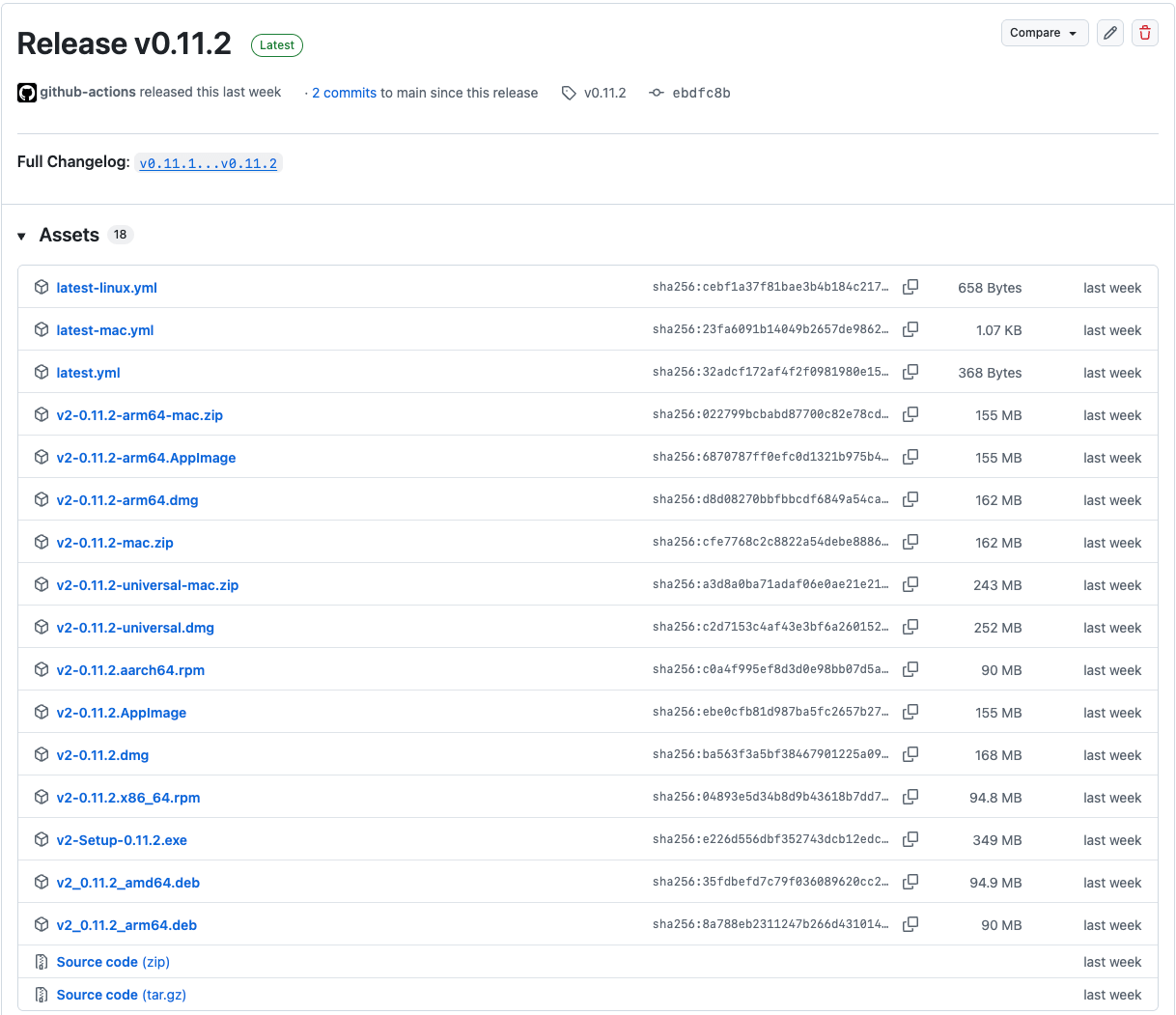
An example release that contains these files is this one.
Import and Configure electron-updater
First, import what’s needed from electron-updater:
import { autoUpdater } from 'electron-updater';Then, configure it as you wish. An example configuration:
import electronLogger from 'electron-log/main';

autoUpdater.forceDevUpdateConfig = true;
autoUpdater.logger = electronLogger;

// When set to false, the update download will be triggered through the API
autoUpdater.autoDownload = false;
autoUpdater.allowDowngrade = false;
Register electron-updater and IPC Events in the Main Process
Before even checking for an update, it is wise to register handlers for events emitted either by electron-updater itself or by the user interacting with the UI.
Handling electron-updater Events
electron-updater emits events as it looks up in the provider whether there are new updates to install, as well as when it reports progress or errors happening in the process. We want to be sure that we register handler functions for these events, so that we can communicate what is happening to the user interface and let the user react. Some events of interest are the following:
checking-for-update: emitted when it starts checking whether there is an update available.update-available: emitted when an available update was found. It usually followschecking-for-update.update-not-available: emitted when no available update was found. It usually followschecking-for-update.download-progress: emitted to report download progress.update-downloaded: emitted when the update has finished downloading.
Reacting to User Actions in the Update Workflow
The user interacts with the app within an update workflow. This means that the main process will be getting events from the renderer process as this happens, which affect how it should proceed with the update, and for which we must register handlers. These events are named by the developer (they are part of the IPC contract), so their names can vary. Some examples are:
- The user prompts the app to check for an update. In the main process we would have to do something like:
ipcMain.handle('check-for-update', async () => {
  await autoUpdater.checkForUpdatesAndNotify();
});- The user prompts the app to download the update. In the main process we would have to do something like:
ipcMain.handle('download-update', (event: Electron.IpcMainInvokeEvent) => {
  startDownload(
    (error, progressInfo) => {
      // progress callback
    },
    () => {
      // complete callback
    }
  );
});

const startDownload = (
  callback: (error: Error | null, info: ProgressInfo | null) => void,
  complete: (event: UpdateDownloadedEvent) => void
) => {
  autoUpdater.on('download-progress', (info: ProgressInfo) =>
    // progress callback
    callback(null, info)
  );
  autoUpdater.on('error', (error: Error) => callback(error, null));
  autoUpdater.on('update-downloaded', complete);
  autoUpdater.downloadUpdate();
};- The user prompts the app to quit and install the update. In the main process we would have to do something like:
ipcMain.handle('restart-to-install-update', () => {
  autoUpdater.quitAndInstall(false, true);
});
Check for an Update on Application Start
You can use the autoUpdater.checkForUpdatesAndNotify method to check for updates. This can also happen when the application starts. But it’s better to make sure that the renderer window has been created before calling this method so that the user can react to a potential notification.